Evolution of Tracking
Modern productivity is no longer about doing more, but about understanding the "why" behind our daily outputs. Quantitative self-tracking allows users to visualize the correlation between specific inputs—like sleep quality or deep work sessions—and their overall professional efficacy. By centralizing these metrics, you transform a static document into a dynamic feedback loop that informs your weekly and monthly planning cycles.
Research suggests that the mere act of tracking increases the likelihood of habit retention by over 40% due to the "Hawthorne Effect," where behavior is modified because it is being observed. In a professional context, using an integrated workspace like Notion or Obsidian allows you to link your habits directly to your projects. This turns a simple streak into a business intelligence asset that justifies your rest or identifies your peak performance windows.
The Psychology of Visual Progress
Humans are neurobiologically wired to respond to visual cues of completion. When you see a "streak" or a filling progress bar, your brain releases a small amount of dopamine, reinforcing the neural pathway associated with that habit. Effective dashboards leverage this by using gallery views and formula-driven progress rings to provide immediate gratification for mundane tasks.
Integration with Daily Work
A habit tracker shouldn't be an island. The most successful systems link habits to a "Daily Journal" database. For example, a software engineer might track "Lines of Code" alongside "Deep Work Hours." By seeing these metrics side-by-side, they can identify that 4 hours of deep work leads to 200% higher quality output than 8 hours of fragmented attention.
Common Tracking Pitfalls
Most users fail because they treat their digital workspace like a playground rather than a cockpit. They build "aesthetic" dashboards with complex widgets that take longer to update than the habit itself takes to perform. This is known as "productive procrastination," where the setup of the system replaces the actual work the system was designed to facilitate.
Another major error is tracking too many variables at once. Attempting to start 10 new habits simultaneously leads to cognitive overload and a total system collapse within 14 days. This is often exacerbated by rigid database structures that don't allow for "partial wins," leading to the "all-or-nothing" fallacy where one missed day causes the user to abandon the entire tracker.
Over-Engineering the Workflow
Adding 15 properties to a single database entry is a recipe for disaster. If it takes more than 30 seconds to log your morning routine, you won't do it on a busy Tuesday. High-friction systems are the primary reason for the 80% abandonment rate seen in personal productivity apps within the first month of use.
Ignoring the Data Utility
Data without analysis is just noise. Many people track their water intake for years without ever looking back at the trends. If your dashboard doesn't summarize your weekly success rate into a "Scorecard," you aren't actually improving; you are just keeping a record of your failures and successes without a strategy for growth.
Professional Strategies
To build a high-conversion dashboard, you must prioritize the "Input-to-Output Ratio." Use Notion's "Button" feature to create one-click logging systems. Instead of opening a database, scrolling to the bottom, and adding a row, you should have a mobile-optimized dashboard with buttons for each habit. This reduces the cognitive load of data entry to nearly zero.
Leverage advanced relations and rollups to connect your habit database to a "Months" database. This allows you to see high-level trends, such as your average consistency percentage for Q1 versus Q2. Professional setups often use a "System Status" formula that changes color based on your daily completion rate—Green for 100%, Yellow for 70%, and Red for anything below that.
Building the "One-Click" Entry
Using Notion's Button block, you can automate the creation of a daily page. Configure the button to "Add page to Habit Database" and set the "Date" property to "Today." This ensures that your tracking begins the moment you open your laptop, removing the barrier of manual entry and keeping your data clean and consistent.
Formula-Driven Progress Bars
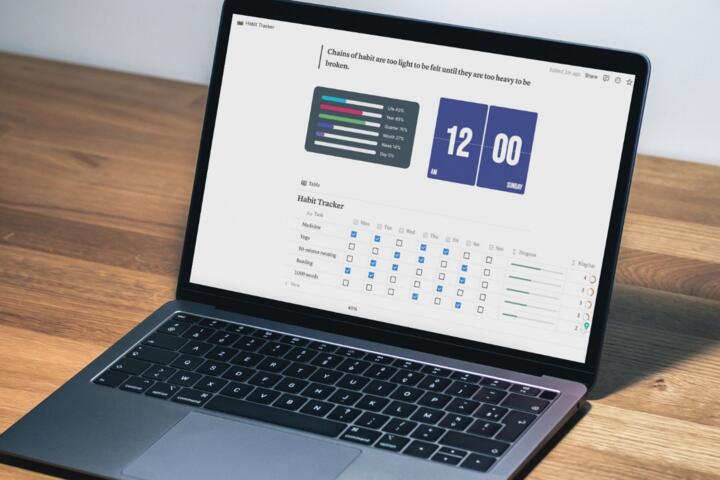
Don't settle for a simple checkbox. Use a formula to calculate a "Daily Score." For instance, if you have 5 habits, create a formula that divides the number of checked boxes by 5. Use the "Slice" and "Repeat" functions to generate a visual bar like [■■■■□]. Seeing a 60% bar stimulates a much stronger psychological drive to finish the day than a list of empty boxes.
Weekly Review Aggregation
Create a separate "Review" database linked to your daily logs. Use a "Rollup" to calculate the average completion rate for the week. If your "Reading" habit is at 30%, but your "Exercise" is at 90%, you have objective data to discuss in your Sunday review. This allows you to adjust your environment to support the struggling habit.
The Power of "Binary" Tracking
Keep your habits binary (Yes/No) for at least the first 66 days—the time it takes for a habit to become automatic according to University College London research. Avoid tracking quantities like "Minutes Meditated" initially. Just focus on whether you sat down. This simplifies the dashboard and focuses on the most important metric: showing up.
Mobile Dashboard Optimization
Design a specific "Mobile View" in Notion. Use a "Callout" block at the very top of your page containing your most frequent buttons. Hide all unnecessary properties. When you are at the gym or in a taxi, you should be able to log a habit with a single tap, ensuring your data remains accurate in real-time.
Efficiency Cases
Consider a boutique marketing agency where the founder struggled with burnout and inconsistent lead generation. By implementing a centralized habit tracker in Notion, they linked "Outreach Calls" and "Deep Work" to their revenue dashboard. Within three months, they identified that revenue lagged by exactly 14 days after a week of low outreach habits, allowing them to predict and prevent cash flow dips.
Another case involves a freelance developer who used a custom dashboard to track "Learning Hours." By visualizing the correlation between time spent on new frameworks and the hourly rate of their subsequent contracts, they saw a 35% increase in annual income. The tracker shifted their mindset from "working harder" to "upskilling strategically," backed by hard data.
Digital Method Comparison
| Feature | Notion Dashboard | Dedicated Apps (Streaks) | Spreadsheets (Excel) |
|---|---|---|---|
| Customization | High (Infinite) | Low (Fixed) | Medium |
| Data Interconnectivity | Excellent (Linked DBs) | None (Siloed) | Moderate |
| Ease of Setup | Moderate (Steep curve) | Instant | Hard (Manual) |
| Visual Analytics | Good (with formulas) | Excellent (Native) | Superior (Charts) |
Avoiding Strategic Errors
The "Perfect Start" trap is the most common reason for abandonment. Many users wait until Monday or the 1st of the month to begin. Expert trackers suggest starting on a random Thursday with just one habit. This builds the habit of *tracking* itself, which is a separate skill from the habit you are trying to monitor. Once the system feels natural, you can scale.
Technical debt is another issue. Avoid using third-party widgets like Indify or Apption for critical tracking data. If their servers go down, your dashboard breaks. Rely on native Notion features—like the 2.0 formulas—to ensure your system is fast, secure, and permanent. Speed is the ultimate feature of any productivity tool; if it's slow, you won't use it.
FAQ
How do I handle missed days in my tracker?
The best approach is the "Never Miss Twice" rule. In your dashboard, create a formula that flags when a habit hasn't been checked for two consecutive days. This acts as an early warning system to get back on track before the habit fully decays.
Can I automate habit tracking with other apps?
Yes, tools like Make.com or Zapier can connect your fitness tracker (Oura, Fitbit) directly to Notion. However, manual tracking for behavioral habits is often more effective because it forces a moment of reflection on the action you just performed.
Is it better to have one big database or several small ones?
Use one master "Daily Log" database for everything. Use "Linked Views" to filter that data onto different pages. This keeps your workspace clean while ensuring all your data lives in one searchable, backable location.
How do I track habits that happen only on weekdays?
Use a formula that checks the "Day of the Week." You can set your "Target" property to only count if the day is not Saturday or Sunday. This prevents your "Consistency Score" from dropping when you are intentionally resting.
What is the ideal number of habits to track?
For beginners, 3 is the limit. For advanced users, 7-10 is manageable. Anything more than 10 creates "Tracker Fatigue," where the management of the system becomes a chore that competes with your actual goals.
Author’s Insight
After five years of building Notion systems for CEOs and creatives, I’ve realized that the most beautiful dashboards are usually the least effective. My own "Daily Cockpit" is quite plain, but it is built on a bedrock of automated relations. I’ve found that the real value of tracking isn't the 100% completion rate—it's the ability to look at a bad month and see exactly what external factors were at play. A habit tracker is not a whip to beat yourself with; it is a mirror to see yourself clearly.
Summary
Building a custom habit dashboard is a transformative step in personal operations. By moving away from rigid, pre-built apps and toward a customized workspace, you create a system that evolves with your needs. Focus on low-friction data entry, use formulas to create visual feedback, and always prioritize the "why" behind the metric. Start today by creating a single database with one checkbox, and let your system grow organically as your discipline increases. The data you collect today is the roadmap for your growth tomorrow.